How to save notes as a Word document or PDF
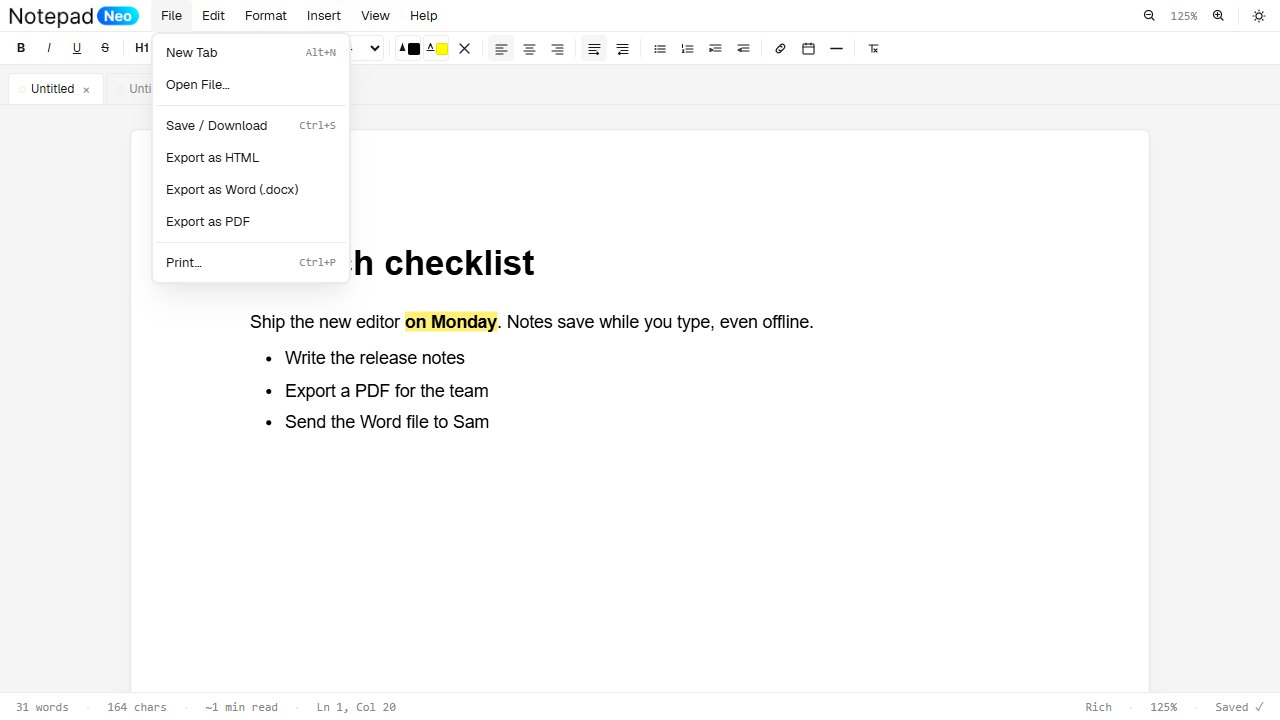
Notes are quick to write but awkward to send. Most people expect a Word file or a PDF. Notepad Neo builds both inside your browser, so the conversion is free and the note is never uploaded.
Save a note as a Word document (.docx)
- Open the online notepad and write or paste your note.
- Rename the tab first by double-clicking its title. The tab name becomes the file name, so you get Meeting notes.docx instead of Untitled.docx.
- Open File → Export as Word (.docx). The file downloads straight away.
Headings, bold, italic, underline and strikethrough, lists, text colour, highlights, links and right-to-left paragraphs all carry over. The file opens in Microsoft Word, Google Docs and LibreOffice.
Save a note as a PDF
- Write the note and rename the tab.
- Open File → Export as PDF.
The PDF keeps your headings, lists and page margins. Notes in Arabic, Hebrew, Chinese, Bengali or other complex scripts take a slightly different route: the editor opens the print dialog instead, and you choose Save as PDF there, which keeps those characters correct. You can use that route for any note by pressing Ctrl+P.
Convert a .txt file to Word or PDF
- Open File → Open File and pick a .txt, .html or .md file from your computer.
- Add headings or formatting if you like.
- Export it as Word or PDF as above.
This is the quickest way to turn a Windows Notepad file into a Word document or a PDF without installing anything.
Other formats
File → Save / Download (Ctrl+S) saves plain text as a .txt file, and Export as HTML gives you a web page that keeps the formatting. If you want to keep notes safe as well as share them, read how to recover unsaved notes.
Quick answers
Is it free to convert notes to PDF or Word?
Yes. There is no limit, no watermark and no sign-up.
Are my notes uploaded when I export them?
No. The Word and PDF files are created in your browser and saved straight to your device.
Why did PDF export open the print window?
Your note contains characters, such as Arabic or Chinese, that the direct PDF export cannot draw. Choose Save as PDF in the print window to keep them.
Free, no sign-up, and your notes stay on your device.
Open the free online notepadMore guides
- How to recover unsaved notes Where an unsaved note really lives, how to get it back in Notepad Neo and in Windows Notepad, and how to stop losing text.
- Notepad keyboard shortcuts: the full list All the shortcuts for formatting, tabs, search, saving and full screen, with the Mac equivalents.
- What is an online notepad, and how do you use one? A plain explanation, how it compares with Notepad and Google Docs, and when an online notepad is the right tool.