The free online notepad that just works.
Notepad Neo is a free, browser-based online notepad — write, format, and save notes instantly, no account, no downloads, no fuss. Everything you need in one fast, private notepad. Free forever.
No account required · Works offline · Your data stays on your device
Why Notepad Neo
Everything you need. Nothing you don't.
Built for people who write fast and think faster. Every feature is deliberate.
Multi-Tab Editing
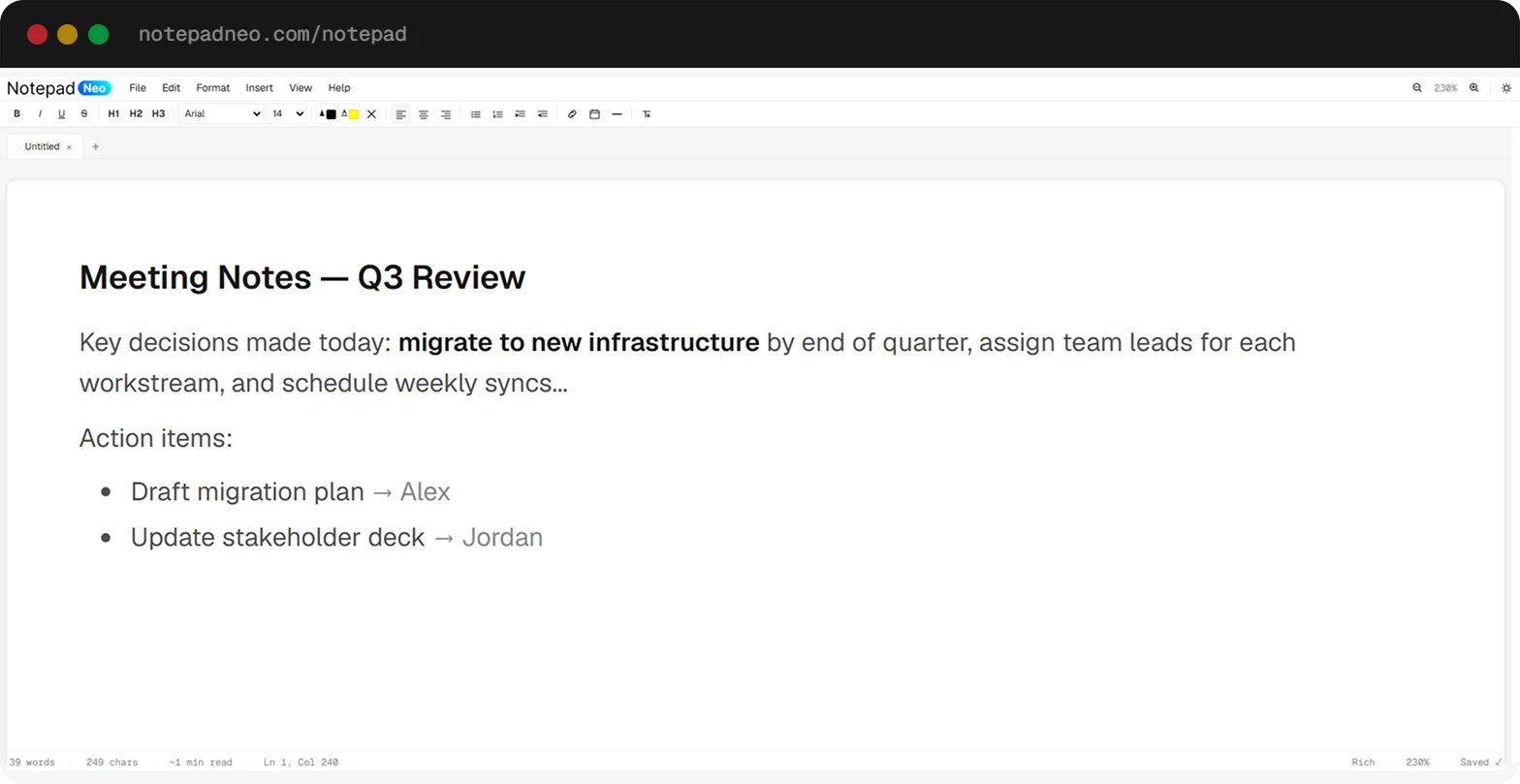
Open as many notes as you need simultaneously. Each tab is independent with its own font, zoom, and format settings. Double-click to rename, right-click to color-code.
Works Offline
Install as a PWA and write without an internet connection. Your notes autosave to your device every 500ms — they survive refreshes, tab closes, even cookie clears.
Floating Window
Open your notes in a floating window that stays on top of other apps. Take notes while watching a video, reading docs, or in a meeting — no Alt+Tab required.
Rich Text Formatting
Full Word-style toolbar with bold, italic, underline, headings, lists, alignment, font family, font size, text color, and highlight — all with keyboard shortcuts.
Find & Replace
Instantly find any text with Ctrl+F. Replace single occurrences or all at once. Supports case-sensitive matching and whole-word search.
Distraction-Free Mode
Press F11 or the fullscreen button to hide all chrome. Just you and your words. A minimal floating toolbar appears on hover for quick formatting.
How It Works
Open. Write. Done.
No account, no setup, no friction. Your notes are ready the moment you open the app.
Open the app
Navigate to notepadneo.com/notepad or install it as a PWA. Your previous session is restored instantly from local storage.
Write anything
Use the full-featured toolbar for rich formatting, or switch to plain text or Markdown mode per tab. All keyboard shortcuts work out of the box.
It saves itself
Autosave fires every 500ms. Export to .txt, .html, or print to PDF any time. Your data never touches a server.
The short version
A writing surface that opens instantly and keeps nothing
Notepad Neo sits in the gap between a plain text box and a full word processor. A text box is too little — you cannot make a heading or a list. Google Docs and Word are too much: they want an account, a few seconds of loading, and a copy of your document on someone else's server.
This is the middle. It opens in under a second, gives you a real formatting toolbar and a tabbed workspace, and stores every note in your own browser. There is no account because there is nothing to log in to — the app has no backend, and your notes are never transmitted anywhere. That is a structural property, not a policy we could change our mind about later.
The trade-off is the obvious one, and worth being clear about before you rely on it: because notes live in your browser's storage, they are tied to that browser on that device. Clearing your browsing data deletes them. There is no sync, and no way for us to recover anything for you.
Reach for it when
- You need somewhere to type in the next three seconds
- The content is private and you would rather it not touch a server
- You are juggling several notes at once and want them tabbed
- You want formatting, but not a document management system
- You are offline, or your connection is unreliable
Use something else when
- You need the same notes on your phone and your laptop
- Someone else has to edit the document with you
- You want to share a note by sending a link
- The note has to survive a browser reset or a lost device
- You need images, comments, or tracked changes
If you are weighing the options, we keep a side-by-side comparison of eight browser notepads that covers where this one loses as well as where it wins, with every claim checked against each tool's own documentation.
How it's built
We write up the hard parts
The editor is one contenteditable div with no editor framework behind it, which makes some ordinary-sounding features surprisingly involved. The DOCX and PDF exporters are written from scratch, and mixed Arabic-and-English notes needed a bidirectional text algorithm running per paragraph. Those write-ups are public.
- Why dir="auto" breaks a mixed-language editor
- Writing a .docx in the browser with no dependencies
- Generating a PDF by letting the browser do the layout
FAQ
Frequently Asked Questions
Including the answers that are inconvenient for us.
In your own browser, using its localStorage and IndexedDB APIs. Nothing is transmitted to us — the app has no backend to transmit it to. The practical consequence is that your notes belong to one browser on one device: clearing your browsing data deletes them, and we cannot recover them for you because we never had a copy.
No. There is no sync, because syncing would require accounts and a server holding your notes — the two things the app is built to avoid. If you need a note on another device, export it (Ctrl+S for .txt, or File → Export for HTML, PDF, or Word) and move the file yourself. If cross-device access matters more to you than local-only storage, a synced notes app is genuinely the better tool.
Autosave writes your workspace to the browser every 500ms after you stop typing, and the status bar confirms with a "Saved ✓" indicator. Reopening the app restores every tab, along with its content, zoom level, and formatting. The worst case in a crash is the last half-second of typing.
Browsers cap localStorage at around 5MB per site, which is a lot of plain text but much less once pasted content brings its own HTML markup along. When a save exceeds that limit, the app detects the failure and transparently moves your data to IndexedDB, which has a far larger allowance. You should not notice the switch happen.
Yes. Install it as a Progressive Web App from Chrome or Edge — there is an install icon in the address bar — and the app works with no connection at all. Since your notes were never on a server, offline is the app behaving normally rather than a degraded mode.
Yes, including in the same note as English. Direction is detected for each paragraph independently from its first letter, so an Arabic paragraph right-aligns and puts its bullets on the right while the English paragraph below it stays left-aligned. You can also pin a paragraph to a direction manually from the Format menu. We wrote up how this works, and why the obvious one-attribute approach fails, in the engineering section.
Plain text (.txt), HTML with formatting preserved, PDF, and Word (.docx). The PDF and Word writers are built into the app rather than provided by a service, so exporting works offline like everything else. You can also open existing .txt, .html, and .md files directly in the editor.
Advertising on the site pages. Ads never see your note content — they run in the page around the editor, and your notes are not readable by anything outside your browser. There is no premium version and no feature held back behind a payment.
We use Google Analytics on the marketing pages to see which pages people visit and roughly where they come from. It records page visits, not note content — there is no mechanism by which what you type could reach it. The cookie policy sets out what is stored in more detail.
Not currently. The source is not published, though the engineering write-ups quote substantial parts of it directly, including the bidirectional text handling and both export pipelines.